AI Gateway
AI Gateway is the unified AI interface management module in the CSGHub Admin Panel. It consolidates management of the gateway overview monitoring dashboard, platform's self-hosted Serverless inference services, third-party commercial API integrations, and centralized MCP Server registration. The AI Gateway menu group is located in the left navigation bar, below the Computing Power Management group, and contains the following four sub-modules:
- Gateway Dashboard: Provides real-time visual monitoring of AI Gateway traffic, performance, upstream health, and request distribution.
- Public Inference: Manage the platform's self-hosted Serverless inference services.
- Commercial API: Configure and manage proxied third-party commercial model services.
- MCP Gateway: Centrally register and manage remote MCP Servers.
1. Gateway Dashboard 
The Gateway Dashboard module provides a visual monitoring screen to help administrators track the operational traffic, performance metrics, and health status of the AI Gateway in real time.
1.1 Global Filters & Controls
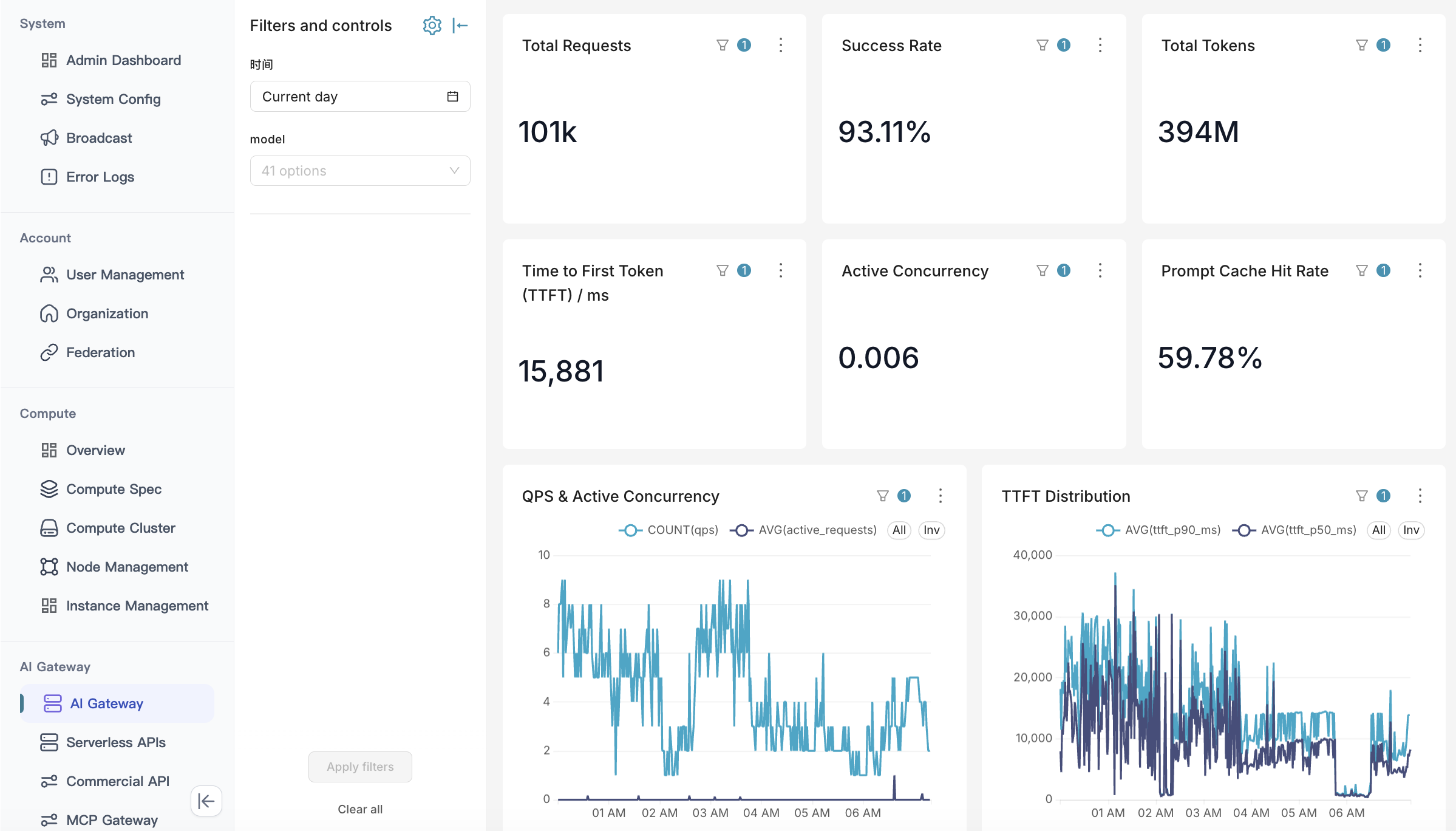
A global filter panel is available at the top/side of the page, supporting filtering by Time Range (e.g., Current Day, Past 24 Hours) and Model, which dynamically updates all statistics and charts across the dashboard.
1.2 Core Metric Cards (KPI Cards)
Key performance and runtime metrics are highlighted at the top:
- Time to First Token (TTFT): Measures the time to generate the first token for streaming requests (Time to First Token / ms), reflecting real-time stream responsiveness.
- Active Concurrency: Displays the instantaneous number of active concurrent HTTP requests and connection load being processed by the gateway.
- Prompt Cache Hit Rate: Tracks the percentage of requests hitting the upstream Prompt Cache, helping evaluate context reuse efficiency and cost optimization.
1.3 Traffic & Latency Distribution Trends
- QPS & Active Concurrency Trend: A dual-axis line chart illustrating changes in queries per second (QPS) alongside active request concurrency.
- TTFT & Latency Distribution: Displays latency distribution curves across P50, P90 percentile tiers to help operations teams detect latency spikes and upstream slowdowns.
1.4 Upstream Channel Health & Top Distribution
- Upstream Health Status: Summarizes the count of Healthy, Degraded, and Unhealthy upstream nodes.
- Top 5 Models / Providers by Requests: Displays the top 5 upstream channels or models by request volume, giving administrators clear visibility into traffic distribution and request success rates.
2. Public Inference
The Public Inference module is used to manage self-hosted Serverless inference services provided externally by the platform. This module supports filtering services by operational status and allows administrators to configure fine-grained billing policies for each service.
2.1 Triggering and Creation
Public inference services cannot be created directly within the AI Gateway module. Administrators must go to Asset Management -> Model, enter the detail page of the target model, and trigger the creation from there.
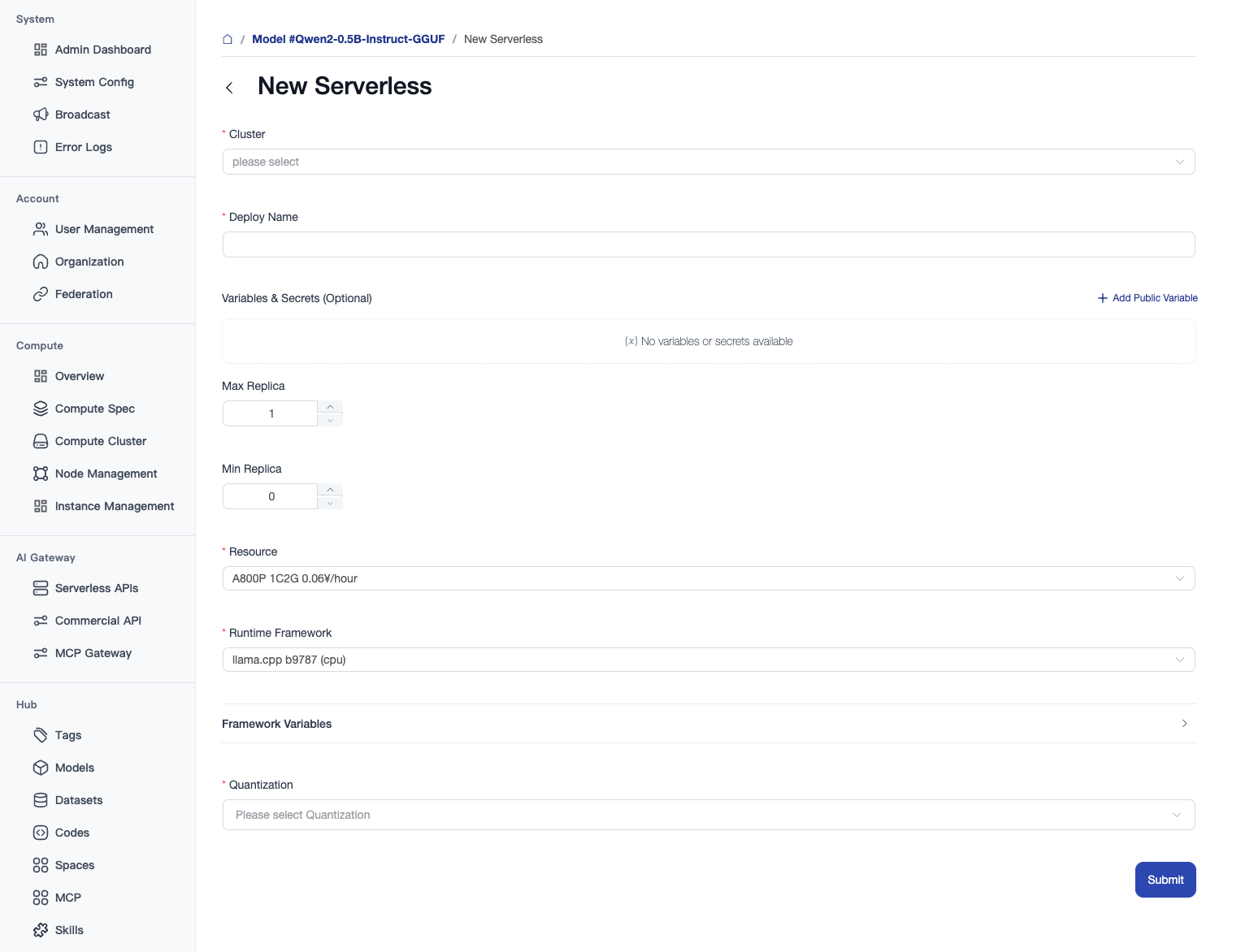
When creating a public inference service, configure the following parameters:
- Cluster (Required): Select the physical or virtual cluster region where the service will be deployed.
- Deployment Name (Required): Define a unique deployment identifier for the serverless inference service.
- Variables & Secrets (Optional): Supports configuring custom public environment variables for the inference environment (by clicking
+ Add Variable). - Min/Max Replicas: Controls the automatic scaling range of the service. Setting Min Replicas to
0enables Scale-to-Zero, which automatically releases computing power when there are no requests, and performs a cold start when a new request arrives. - Resources (Required): Select the hardware specifications for the service to run on.
- Runtime Framework (Required): Select the inference engine/runtime framework to load the model (e.g.,
llama.cpp). - Framework Parameters (Optional): Supports configuring advanced custom runtime parameters for the inference framework to optimize model performance.
- Quantization (Required): For quantized models, select the corresponding quantized weights file (e.g., in
.ggufformat) from the model repository.
2.2 Service Management and Editing
Once the service is created and started, it will be listed under AI Gateway -> Public Inference. Here, administrators can monitor its status, manage its lifecycle, and enter the details page to modify model runtime parameters.

3. Commercial API
The Commercial API module is designed to proxy, centrally control, and distribute third-party commercial large model services.
3.1 List Management
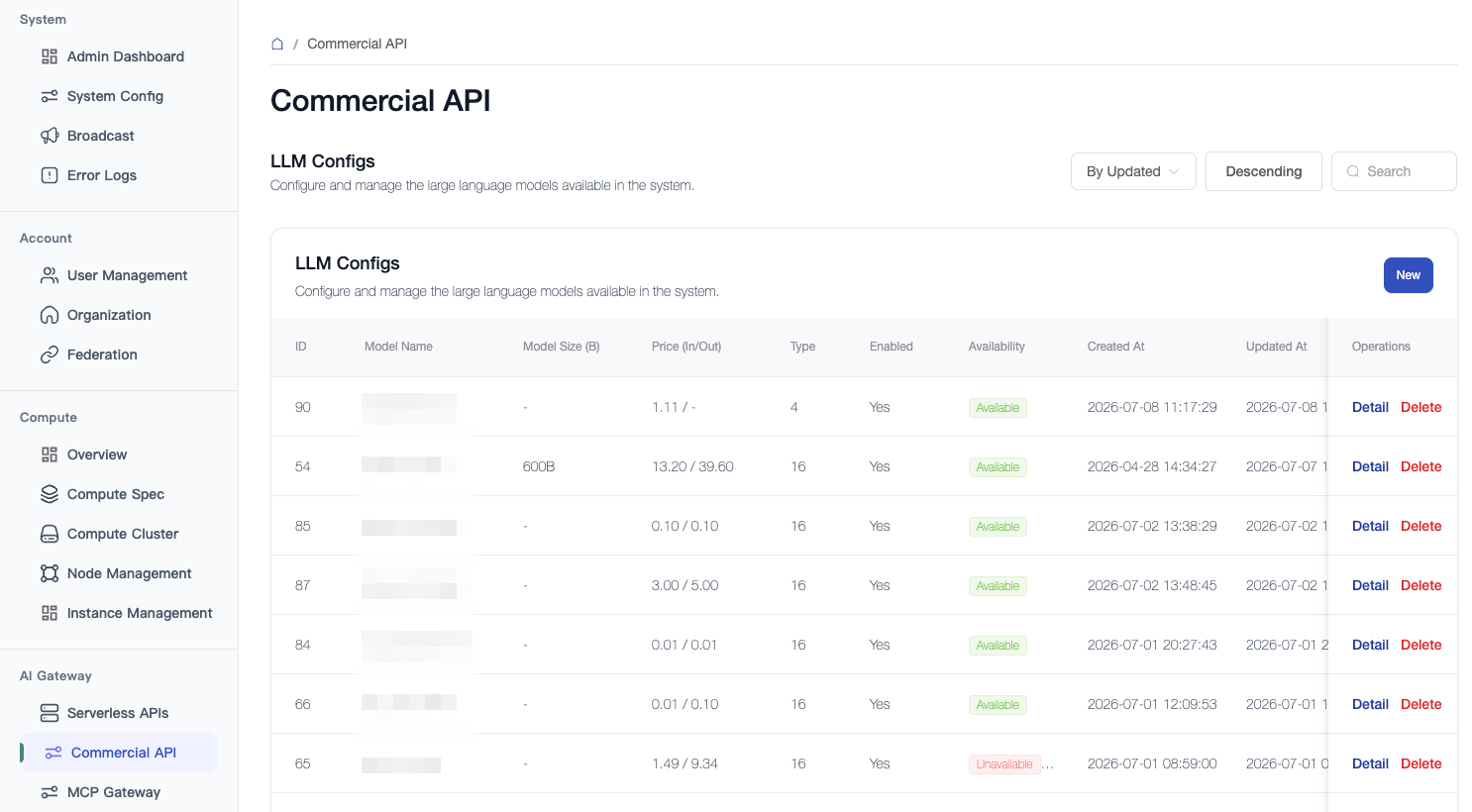
The Commercial API list page displays information about all currently connected commercial models, including ID, Model Name, Model Parameters (B), Price, Type, Enabled Status, and Availability Status (shows a green "Available" badge if the API channel and credentials are functional, and a red "Unavailable" badge otherwise).
3.2 Creation and Configuration
Click Create Commercial API to enter the configuration form.
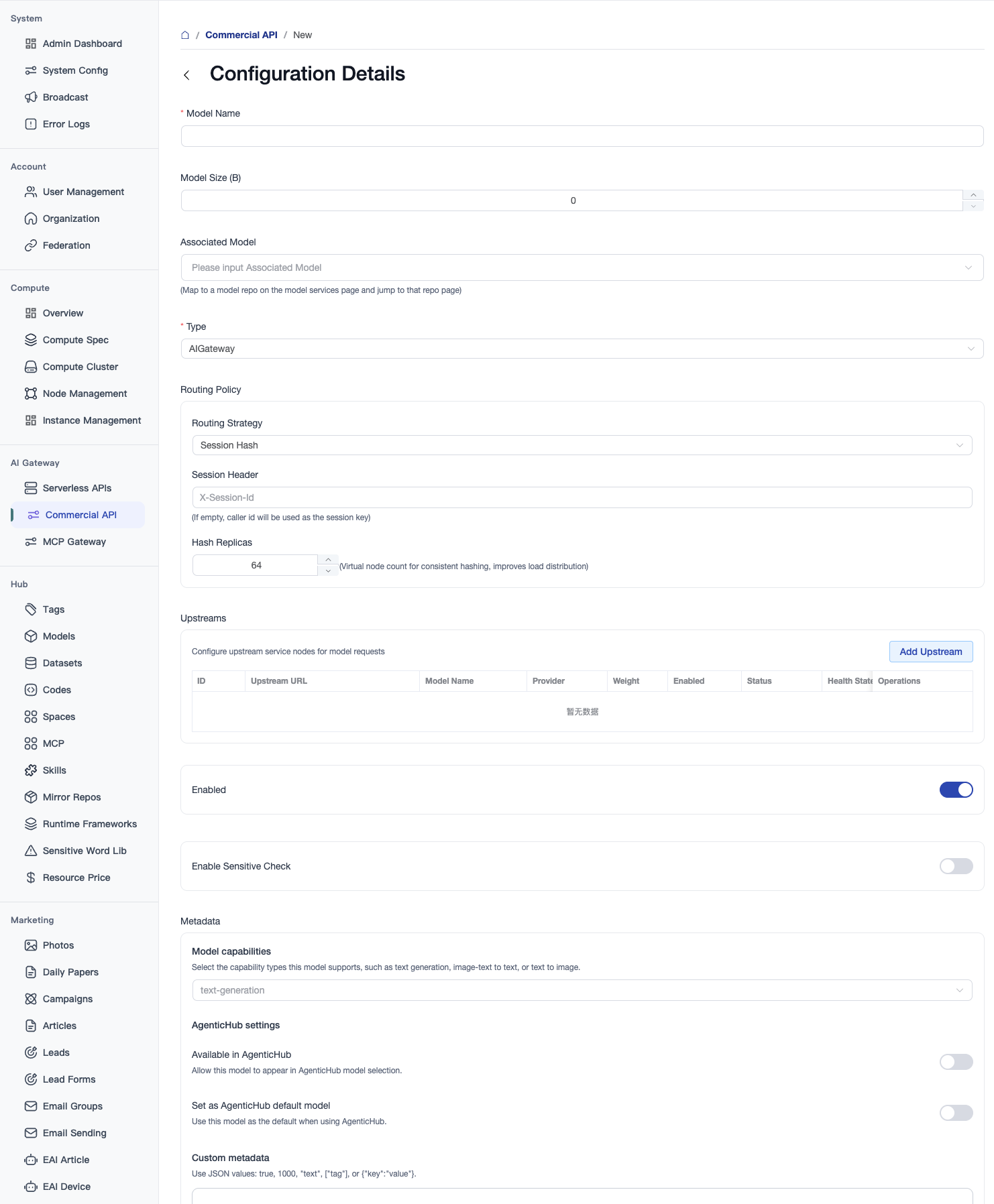
Configuration options are divided into four main dimensions:
A. Basic Info
- Model Name (Required): The unified model identifier exposed externally for the commercial API service.
- Model Parameters (B) (Optional): Indicates the parameter size of the commercial model, defaults to
0. - Associated Model (Optional): Binds the API route to an internal model repository hosted on the platform, which is used for the model description on the user side.
B. Routing Policy
Controls request distribution and routing across multiple upstream service nodes:
- Routing Policy Type: The algorithm used to distribute traffic among upstream nodes:
- Round Robin: Requests are distributed sequentially. Recommended for single-turn, non-session tasks (e.g., image generation, translation, text classification) to ensure a highly balanced backend load.
- Session Hash (Consistent Hashing): Routes requests based on a specific identifier, ensuring requests from the same session stick to the same node. Recommended for multi-turn chats and Agent interactions to maximize Prompt Cache (KV Cache) utilization and reduce first-token latency (TTFT).
- Session Header (Optional): Specifies the HTTP request header (e.g.,
X-Session-Id) used to compute hash values. If left blank, defaults to the caller ID. - Hash Replicas (Optional): The number of virtual nodes on the consistent hashing ring (defaults to
64). A higher number ensures a more balanced load distribution.
- Session Header (Optional): Specifies the HTTP request header (e.g.,
C. Upstream Nodes
Configure multiple upstream service nodes providing the same model capability for high availability and weighted load balancing. Click Add Upstream Node to configure:
- Endpoint URL and API Key: The API access address (e.g.,
https://api.openai.com/v1) and the corresponding API Key for the third-party service. - Weight: The traffic allocation ratio among upstream nodes.
- Status / Health Status: Shows the network connectivity and health status of the upstream node.
D. Attributes & Advanced Configurations
- Enabled Status: Global switch to enable or disable this commercial API proxy channel.
- Enable Sensitive Check: When toggled on, all input and output content of this commercial API will go through the platform's sensitive words filtering system to prevent inappropriate content.
- Model Capability: Select the capability tags (e.g.,
text-generation,text-to-image, etc.) supported by this model. - Custom Attributes: Provides a JSON editor allowing administrators to define custom KV properties for flexible business extensions.
4. MCP Gateway
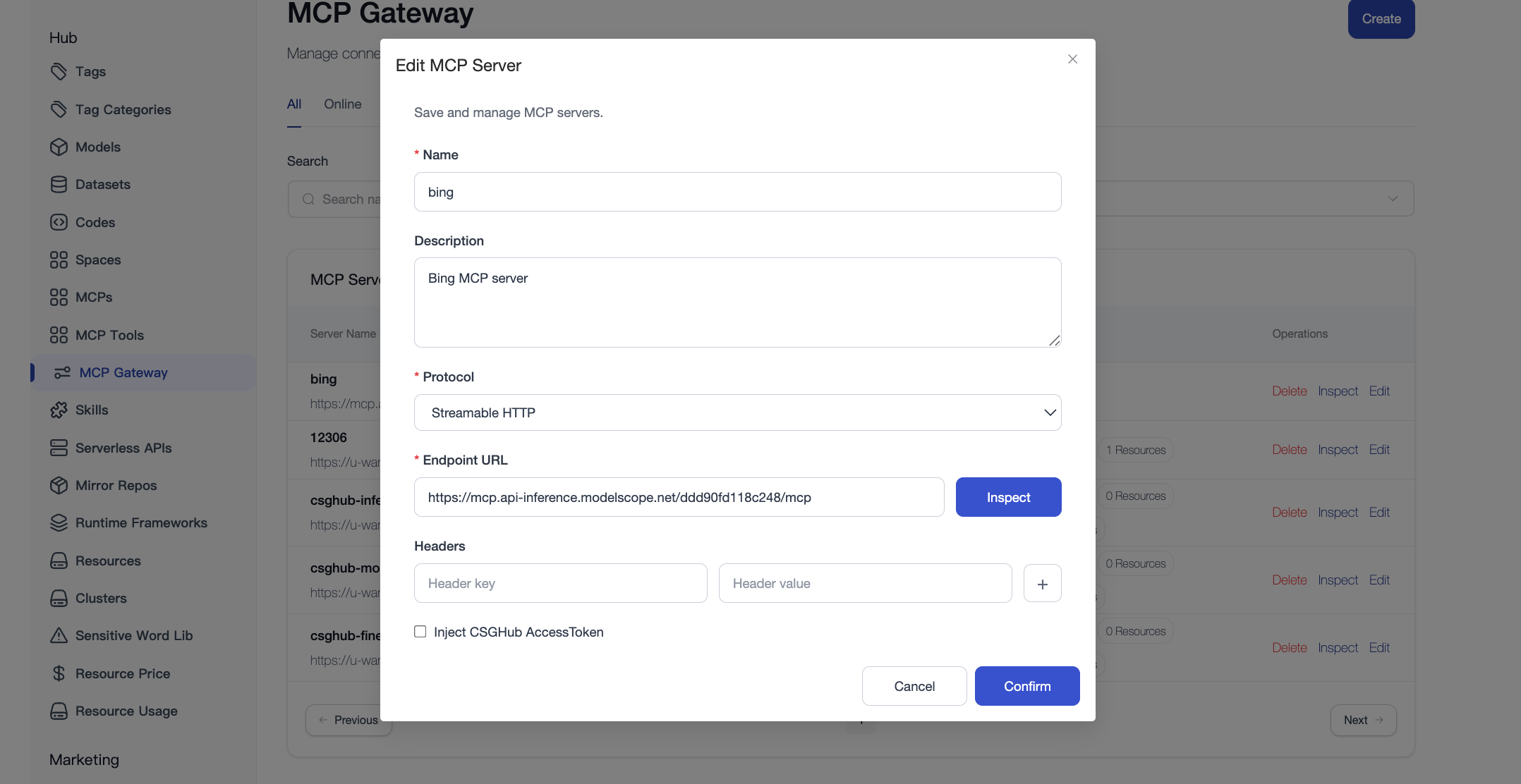
MCP Gateway supports centralized registration and management of remote MCP Servers. By configuring the Endpoint URL, connection type, and request headers, remote MCP Servers can be connected to the platform, which then provides a unified MCP service access point for applications.
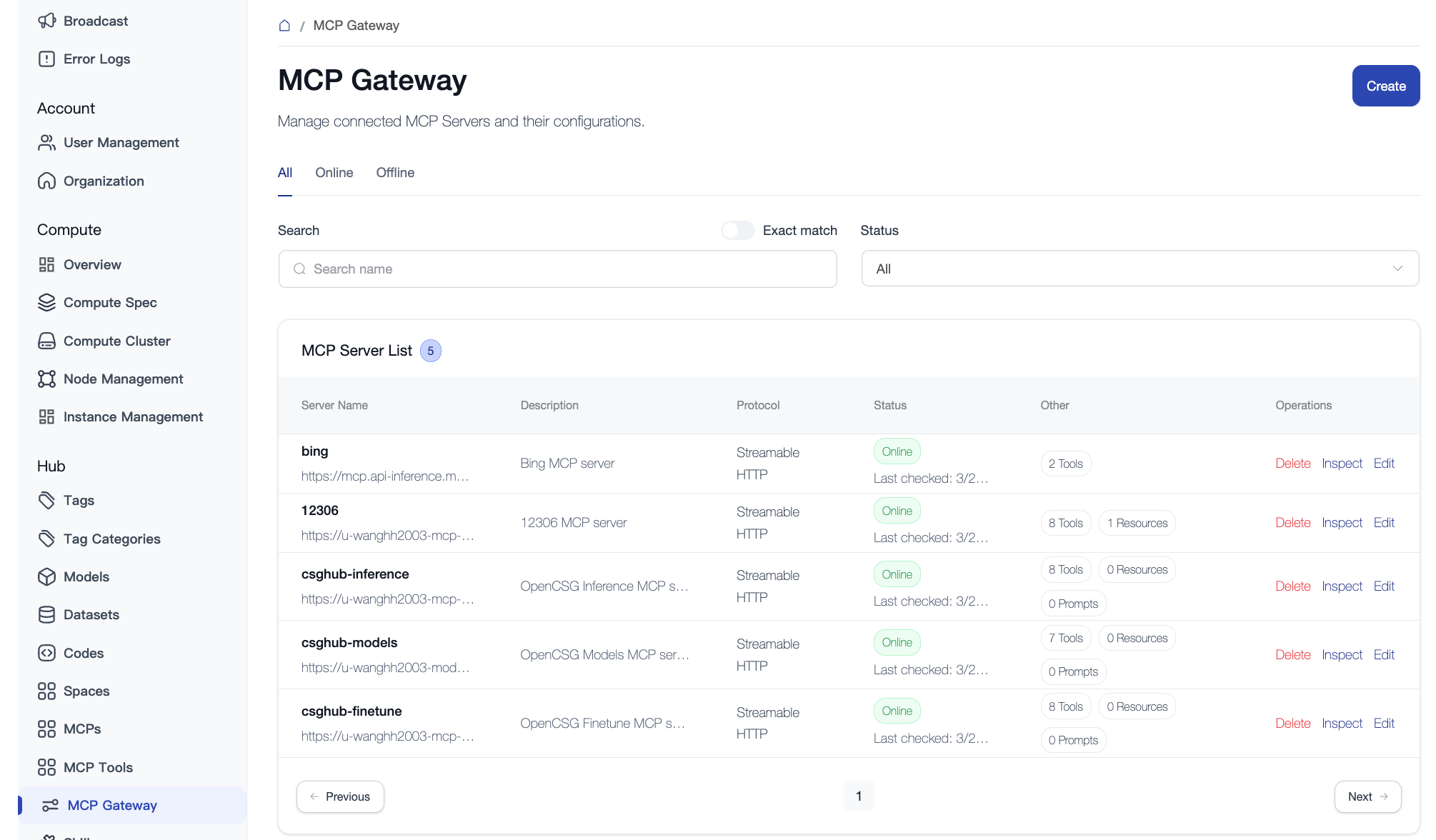
Supports editing registered MCP Servers, including name, description, Endpoint URL, connection type, and request headers.