MCP
MCP (Model Context Protocol) is a standardized way to attach external tools and data to agents and flows in a discoverable, callable way. For collaboration channels such as Feishu and WeChat, see OpenClaw. For generic tools and API auth, see UI tour. For business logic units, see Skills.
Besides resource and skills repo entry points, on an open instance in chat view you can open MCP from the bottom tool strip; the two steps below follow the in-product UI; labels and fields follow production.
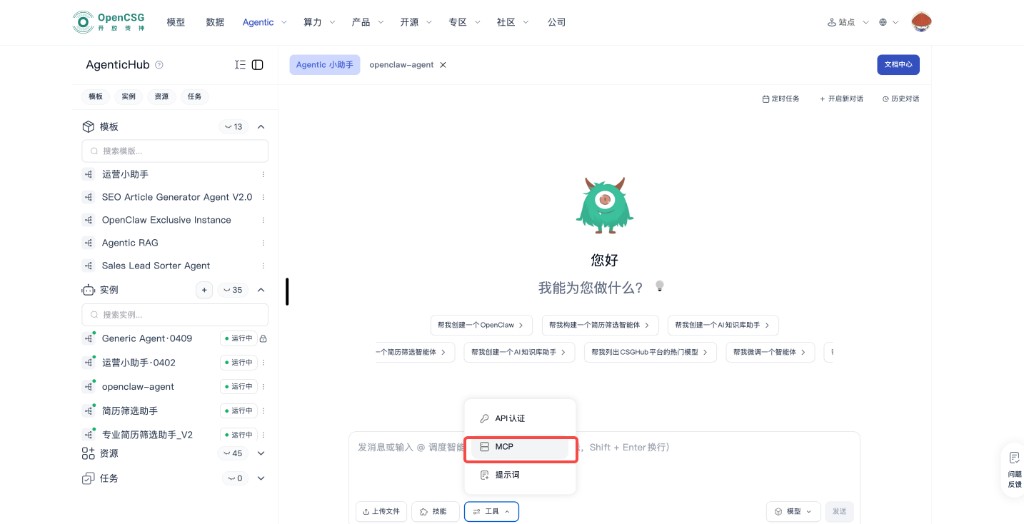
Step 1: Open MCP on the instance chat page
Select an instance in the left list, open its chat. On the input row, open Tools, then MCP, to show the MCP dialog. The same menu often has API auth, Prompts, and related items.
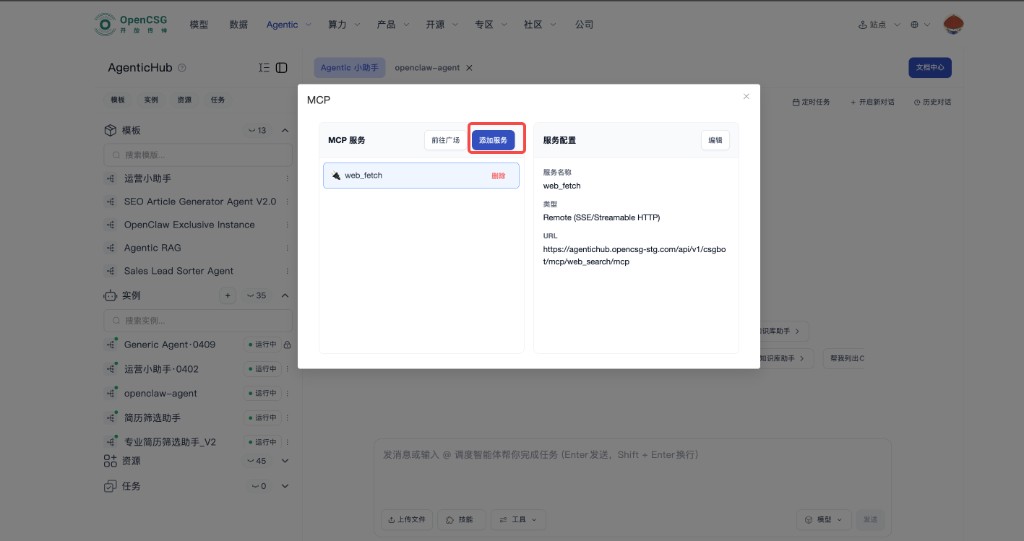
Step 2: Add or manage services in the dialog
The left side lists MCP services; you can go to a gallery, Add service for a new remote, or remove entries. The right side shows the selected service: name, type, endpoint, etc. Common types are remote access with SSE or Streamable HTTP to the model side—form options are authoritative. After save, the service is available to this instance’s chat. The example below may show web_fetch and a sample URL; real URL, auth, and network policy must match your environment and security.
When to use MCP
- You already have many HTTP or script integrations and want one description model instead of custom glue per agent.
- You want one tool directory reused across instances with platform-managed discovery and auth.
Configuration and security
- Least-privilege credentials per service; rotate regularly; do not put keys in public skills or prompt libraries.
- Test timeout, retry, and error mapping in a non-prod instance before production; add audit and access logs for high-sensitivity data.
- Prefer HTTPS for remote URLs; align with firewall, IP allowlist, and gateway auth—avoid exposing raw internal, non-redacted APIs to the model chain.
How MCP relates to OpenClaw
- OpenClaw = people on collaboration channels, see OpenClaw. MCP = tool and data for the model. Both can be used; map flows and trust boundaries to avoid double-exposing a sensitive API.