OpenClaw
OpenClaw connects agent capabilities to Feishu, WeChat, and other work and social channels. For generic tool entry and API credentials, see UI tour. For a unified protocol to extend tools and data for the model, see MCP in MCP. For business-specific scripts, see Skills.
Integration overview
In AgenticHub, OpenClaw is created and run as an instance type with its own management and chat UI. Available IM types, form fields, and menus follow what you see in production.
Create OpenClaw in three steps
Step 1: Start from the Agentic assistant
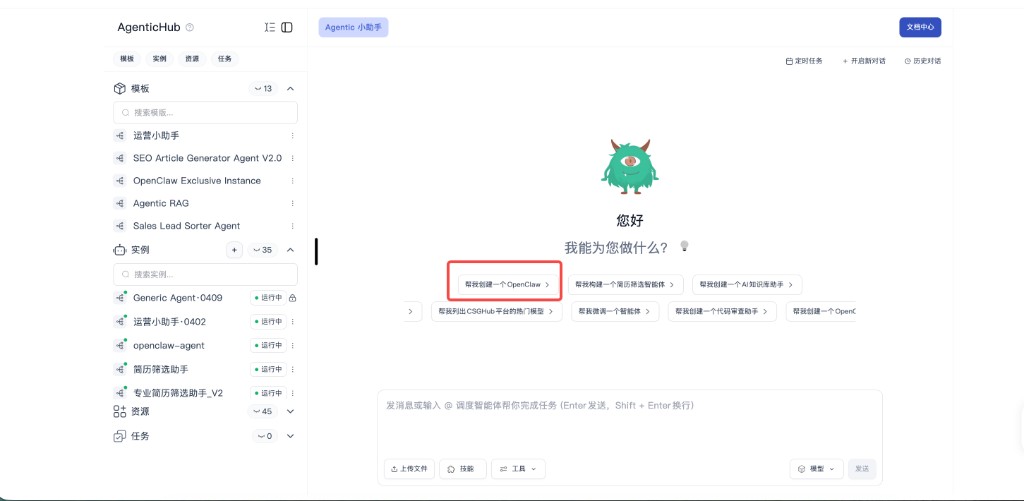
After opening the Agentic module, the center is the assistant chat. The empty state shows greetings and shortcuts; use a chip such as “Help me create an OpenClaw” or type the same request. The left Templates list may also include OpenClaw Exclusive Instance or similar as an alternate path.
Step 2: Complete the “create agent” form
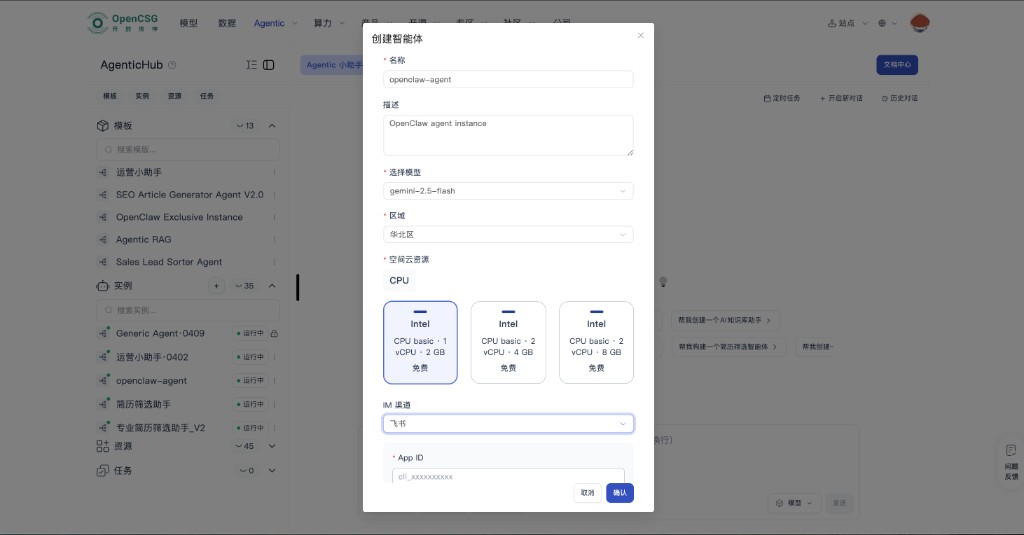
A dialog creates a runnable OpenClaw-style instance. Typical fields:
- Name / description — e.g. name
openclaw-agentand a short purpose. - Model / region — pick by latency and compliance; model list is platform-specific.
- Space cloud resources — e.g. CPU size; a common entry is 1 vCPU / 2 GB—see billing in console.
- IM channel — choose the target channel; the example below uses Feishu. Fill App ID and other required credentials; complete starred fields before Confirm.
Other channels, when available, look similar with different field names.
Step 3: Open the OpenClaw console on the instance
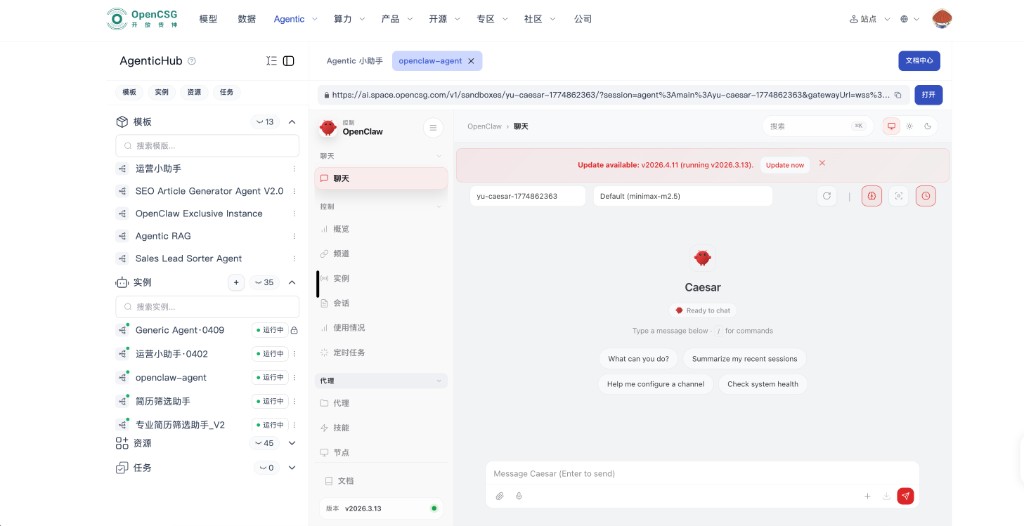
After create and start, the instance appears in the left list (often Running). Inside, the product UI usually has a left nav (chat, Control, Agent) with sub-items such as Overview, Channel, Instance, Session, Usage, Scheduled tasks under control, and Agent, Skills, Nodes on the agent side. Center: chat for that proxy. If a version update banner appears, plan upgrades to avoid channel incompatibility per team policy.
What it does
- Send and receive in Feishu, WeChat, and similar, for notifications, simple forms, and light write-back—so conclusions from AgenticHub reach people in their regular workflow.
- With scheduled tasks and in-product instance chat, you can extend key steps to IM for reminders or confirmation.
Cautions when connecting
- Prove auth, callback URLs, and allowlists in a sandbox or small set of accounts before production; keep App ID and secrets in controlled storage—never in a public skill or a leaked screenshot.
- Be explicit about bot identity, scope, and data retention; avoid sending sensitive resumes or customer data to the wrong group or account.
Ops and troubleshooting
- Expired tokens, bot removed from a group, or TLS/domain policy changes are common failure modes—put them in a team checklist.
- Agree on retry and manual fallback with the business; when session or channel lists look wrong, compare control-side Channel and Session with the IM app.
How OpenClaw relates to MCP
- OpenClaw = reach people on collaboration channels. MCP = model-callable tool and data surface. Details: MCP. Both can coexist; draw data flow and trust boundaries on architecture diagrams so the same sensitive API is not double-exposed by mistake.